Difference between revisions of "Tinylex on a Palm"
Jump to navigation
Jump to search
(Adding PalmOpenDic information) |
|||
| (20 intermediate revisions by 2 users not shown) | |||
| Line 1: | Line 1: | ||
{{TOCD}} |
{{TOCD}} |
||
'''Mobile dictionaries for Palm''' can be generated using the '''dix2tiny''' task in apertium-dixtools package. |
'''Mobile dictionaries for Palm''' can be generated using the '''dix2tiny''' task in [[Apertium-dixtools|apertium-dixtools]] package. |
||
[[Image:Palm-os-emulator.png|thumb|300px|right|Palm OS Emulation]] |
[[Image:Palm-os-emulator.png|thumb|300px|right|Palm OS Emulation]] |
||
| Line 7: | Line 7: | ||
== Requirements == |
== Requirements == |
||
* [[Apertium-dixtools|Apertium DixTools]] |
|||
* Ant |
|||
* Java Development Kit 6 (JDK6) |
|||
* Netbeans (>6.0) (some libraries are needed to build the project) |
|||
* PalmOpenDic |
* PalmOpenDic |
||
* A Palm device |
|||
== Download and install Apertium DixTools == |
== Download and install Apertium DixTools == |
||
| Line 22: | Line 21: | ||
where: |
where: |
||
* '''dix''': |
* '''dix''': an apertium [[Bidix|bilingual dictionary]] (.dix). |
||
* '''lang-pair''': the code for the language pair (es-ca, en-es, etc.) |
* '''lang-pair''': the code for the [[Language_pair|language pair]] (es-ca, en-es, etc.) |
||
* '''lang-pair-text''': the name of the language pair (Spanish-Catalan, English-Catalan, etc.) |
* '''lang-pair-text''': the name of the language pair (Spanish-Catalan, English-Catalan, etc.) |
||
* '''platform''': in this particular case (dictionaries for Palm), the option must be 'palm'. |
* '''platform''': in this particular case (dictionaries for Palm), the option must be 'palm'. |
||
* '''filter''': an XML config file with some filtering rules. |
* '''filter''': an XML config file with some filtering rules. |
||
Example: |
|||
| ⚫ | |||
$ apertium-dixtools dix2tiny apertium-en-es.en-es.dix en-es English-Spanish palm config-en-es.xml |
|||
There is a lot of people out there who use Palm handhelds and could benefit from Apertium bilingual dictionaries. |
|||
This command will generate two files: |
|||
There is an opensource application for Palms called [http://pzdbview.sourceforge.net/palmopendic.html PalmOpenDic] that can handle dictionaries. |
|||
* <code>en-es-data.cc</code> |
|||
Dictionaries in a rather easy text-like format such as the one used by [http://dict.cc dict.cc] (see [http://www1.dict.cc/translation_file_request.php the file request page of dict.cc]) can be converted with a Java application (for the desktop) inside PalmOpenDic into the Palm database format used by PalmOpenDic. |
|||
* <code>en-es-apertium-palm.pdb</code>. This is the file required for PalmOpenDic. |
|||
=== Stable and nightly builds === |
|||
Apertium bilingual dictionaries could easily be converted, using ltexpand, into a dict.cc-like format and then distributed with PalmOpenDic. |
|||
* '''Stable''' versions of the dictionaries (.pdb files) are available in the [https://apertium.svn.sourceforge.net/svnroot/apertium/trunk/apertium-mobile/apertium-tinylex-palm/ apertium-tinylex-palm] SVN directory. |
|||
Mikel has tried to install a the resulting, converted file into his Zire 22 Palm but got a message when using [http://www.jpilot.org/ jpilot] to install ("Instal·lació de DictCC.pdf ha fallat"). This was probably because the file was too large. After converting just a section, it worked nicely. |
|||
* There's also a '''nightly build''' for each language pair to download from [http://www.apertium.org/files/palm/ www.apertium.org/files/palm]. |
|||
=== An example of configuration file === |
|||
<pre> |
|||
<?xml version="1.0" encoding="UTF-8"?> |
|||
<!DOCTYPE properties SYSTEM "http://java.sun.com/dtd/properties.dtd"> |
|||
<properties> |
|||
<comment>Configuration</comment> |
|||
<!-- force to preserve the following tags --> |
|||
<entry key="preserveTags">n,adj,adv,vblex</entry> |
|||
<!-- force to ignore the following tags --> |
|||
<entry key="ignoreTags">GD,ND,cm</entry> |
|||
<!-- ignore tags not listed in 'preserveTags' and 'ignoreTags' properties --> |
|||
<entry key="ignoreNotListedTags">no</entry> |
|||
<!-- characters to remove --> |
|||
<entry key="removeCharacters">\\*</entry> |
|||
<!-- characters to replace with blank --> |
|||
<entry key="replaceCharactersWithBlank">_</entry> |
|||
<entry key="rename_n">noun</entry> |
|||
<entry key="rename_adv">adverb</entry> |
|||
<entry key="rename_adj">adjective</entry> |
|||
... |
|||
</properties> |
|||
</pre> |
|||
== Screenshots == |
|||
<gallery> |
|||
Image:Palm-os-emulator.png|Searching dictionary entries |
|||
Image:Pose-example.png|Example of dictionary entry |
|||
</gallery> |
|||
| ⚫ | |||
<videoflash>o9o1wtb5jGc</videoflash> |
|||
== Related software == |
== Related software == |
||
* [[Apertium-tinylex|Apertium TinyLex]]: a J2ME (Java 2 Micro Edition) program for mobile devices which looks up dictionary entries. |
* [[Apertium-tinylex|Apertium TinyLex]]: a J2ME (Java 2 Micro Edition) program for mobile devices which looks up dictionary entries. |
||
* [[Apertium Android|Apertium Android]] |
|||
== External links == |
|||
* [http://www.tinylex.com/download_palm.php TinyLex.com:] Apertium TinyLex binaries for Palm at tinylex.com. |
|||
* [http://pzdbview.sourceforge.net/palmopendic.html PalmOpenDic]: PalmOS dictionary application for PalmOS 3.5 or higher. It can be used to view (and search in) dictionaries which are stored on your Palm. |
* [http://pzdbview.sourceforge.net/palmopendic.html PalmOpenDic]: PalmOS dictionary application for PalmOS 3.5 or higher. It can be used to view (and search in) dictionaries which are stored on your Palm. |
||
* [http://sourceforge.net/projects/pose/ Palm OS Emulator] is used for writing, testing, and debugging Palm OS applications. |
|||
* [http://www.jpilot.org/ J-Pilot]: a desktop organizer application for PalmOS devices. |
|||
[[Category:User interfaces]] |
|||
[[Category:Tools]] |
|||
Revision as of 19:44, 28 December 2009
Mobile dictionaries for Palm can be generated using the dix2tiny task in apertium-dixtools package.

Requirements
- Apertium DixTools
- PalmOpenDic
- A Palm device
Download and install Apertium DixTools
- See Apertium-DixTools.
Generating dictionaries for PalmOpenDic
$ apertium-dixtools dix2tiny <dix> <lang-pair> <lang-pair-text> <platform> [<filter>]
where:
- dix: an apertium bilingual dictionary (.dix).
- lang-pair: the code for the language pair (es-ca, en-es, etc.)
- lang-pair-text: the name of the language pair (Spanish-Catalan, English-Catalan, etc.)
- platform: in this particular case (dictionaries for Palm), the option must be 'palm'.
- filter: an XML config file with some filtering rules.
Example:
$ apertium-dixtools dix2tiny apertium-en-es.en-es.dix en-es English-Spanish palm config-en-es.xml
This command will generate two files:
en-es-data.ccen-es-apertium-palm.pdb. This is the file required for PalmOpenDic.
Stable and nightly builds
- Stable versions of the dictionaries (.pdb files) are available in the apertium-tinylex-palm SVN directory.
- There's also a nightly build for each language pair to download from www.apertium.org/files/palm.
An example of configuration file
<?xml version="1.0" encoding="UTF-8"?>
<!DOCTYPE properties SYSTEM "http://java.sun.com/dtd/properties.dtd">
<properties>
    <comment>Configuration</comment>

    <!-- force to preserve the following tags -->
    <entry key="preserveTags">n,adj,adv,vblex</entry>

    <!-- force to ignore the following tags -->
    <entry key="ignoreTags">GD,ND,cm</entry>

    <!-- ignore tags not listed in 'preserveTags' and 'ignoreTags' properties -->
    <entry key="ignoreNotListedTags">no</entry>

    <!-- characters to remove -->
    <entry key="removeCharacters">\\*</entry>

    <!-- characters to replace with blank -->
    <entry key="replaceCharactersWithBlank">_</entry>

    <entry key="rename_n">noun</entry>
    <entry key="rename_adv">adverb</entry>
    <entry key="rename_adj">adjective</entry>
    ...
</properties>
Screenshots
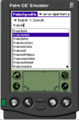
Searching dictionary entries
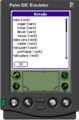
Example of dictionary entry

Video demo
<videoflash>o9o1wtb5jGc</videoflash>
Related software
- Apertium TinyLex: a J2ME (Java 2 Micro Edition) program for mobile devices which looks up dictionary entries.
- Apertium Android
External links
- TinyLex.com: Apertium TinyLex binaries for Palm at tinylex.com.
- PalmOpenDic: PalmOS dictionary application for PalmOS 3.5 or higher. It can be used to view (and search in) dictionaries which are stored on your Palm.
- Palm OS Emulator is used for writing, testing, and debugging Palm OS applications.
- J-Pilot: a desktop organizer application for PalmOS devices.

